
Report Options in SentryLogic
Reports are a great way to summarize system performance over time. SentryLogic offers multiple report options with our paid monitoring plans.
Reports can be generated on a Daily, Weekly or Monthly schedule. You can view present or past versions of reports at anytime by logging into your account. You can also arrange for reports to be automatically deliverd via email by setting up report subscriptions.
Below are some examples of report formats that are available. Contact us at info@redtreesys.com if you would like see your data presented in one of these formats and we’ll create a report for you. In the future we will offer a Report Designer that you can use to create reports yourself.
Meter Reports:
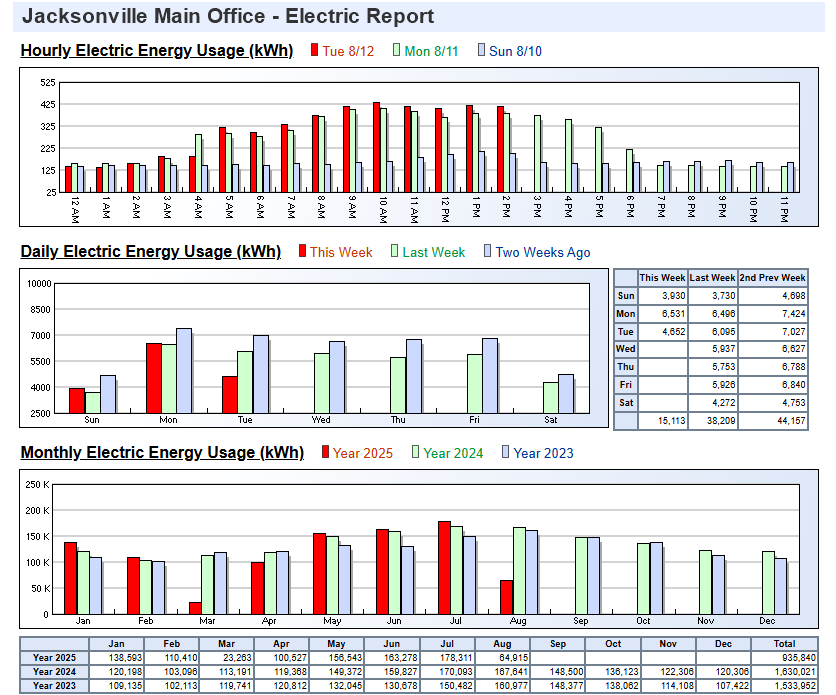
Meter Reports are perfect for visualizing when and how much energy is being consumed by the hour, day, week, month and year.
The example here is for a typical electric meter.
Hour-by-hour totals are compared with those from previous days.
Daily totals are compared with those from previous weeks.
Finally, monthly totals are compared with those from previous years.
Room Environmental Conditions Reports
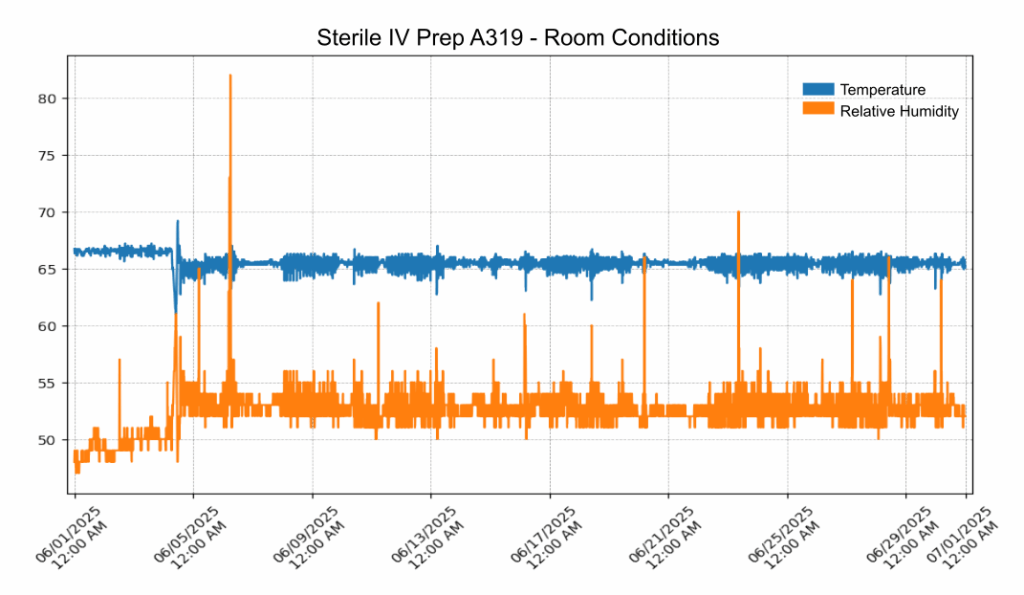
Many hospital and clinical facilities are required to monitor and record environmental conditions in critical areas.
SentryLogic’s report features replace the task of manual record keeping.
Values of Room Temperature, Relative Humidity and Pressure can be easily incorporated into reports.
Reports can be viewed online and scheduled for email delivery at scheduled intervals.